
I use the multi channel version with pro tools and frequently catch the plugin profile having switched itself without my doing on re-launch. I'm not sure if the plugin is trying to follow the last setting from systemwide or what, but it's driving me insane. If I forget to double check on re-opening a session, I run the risk of wasting hours of work mixing with the headphone preset playing instead of my multichannel speakers profile.
Not only this, but the multichannel version has stacked output gains that will apply the safe headroom value on twice. It makes zero sense that channel groups operate as sub group of the master output. The output will hold the safe headroom value from my other preset while applying the safe headroom to the groups still, (applying an extra -10db) meaning I have to fix my session to compensate after noticing this (picture below).
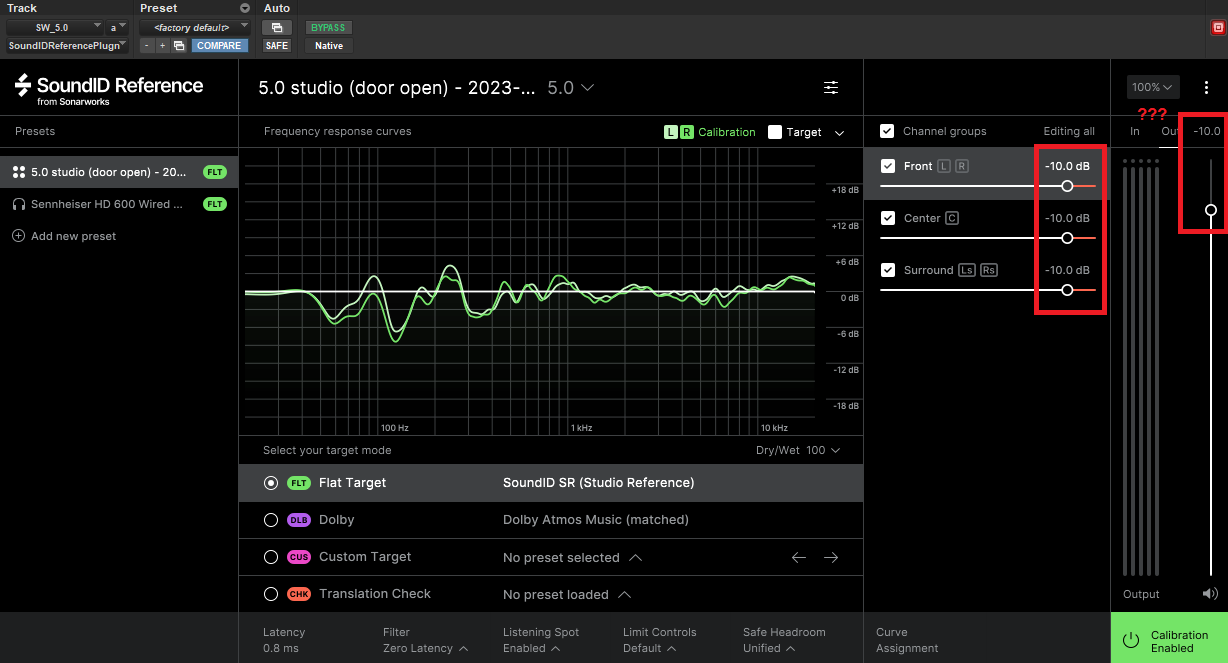
I have seen a couple other posts regarding preset swapping as early as 2021 and clearly it's still unresolved (software is up to date).
Running Pro Tools 2022, Win 10, Motu 8A.
1 comment
Hi, thanks for your post, sorry to hear there are some issues present!